
SMS Auto Reply - Autoresponder
LeMi Apps | SMS Automation & Auto Reply AppsCommunication
3.1108.00 Reviews
- Version
- 8.8.4
- Installs
- 10.00K
- Age Rating
- Everyone
Screenshots
Our Review of SMS Auto Reply - Autoresponder
 Analysis by Appyee
I tested SMS Auto Reply - Autoresponder as a practical communication tool rather than as a flashy messaging replacement. Its purpose is simple: send an automatic response when I am busy, away, driving, resting, or deliberately trying not to answer every message immediately. That narrow focus is also its main appeal. It does not ask me to move conversations to a new platform, and it works around ordinary text messaging habits instead of replacing them.
Published by LeMi Apps | SMS Automation & Auto Reply Apps, this communication app has been available since December 4, 2014. It is currently at version 8.8.4, supports Android 6.0 and later, and carries an Everyone age rating. The price is $7.49, so the decision is less about discovering a free experiment and more about deciding whether dependable automatic texting is valuable enough for my routine.
My overall impression is mixed but useful. The concept is easy to understand, and it can remove a surprisingly common source of stress: repeatedly explaining that I cannot answer right now. At the same time, the experience is not as effortless as a built-in phone setting. Anyone considering it should pay attention to how clearly they can read its controls, how comfortable they are configuring message rules, and whether their phone handles background automation reliably.
How the app feels to use in everyday situations
I find the app easiest to judge by the small routines it could support: a work block, an appointment, or a stretch of travel when I want to stay off my phone. The useful test is whether its reply still feels appropriate after the situation changes, not just whether it works once. That makes the next question how much ongoing attention a dependable setup asks of me.
Readability and navigation during setup
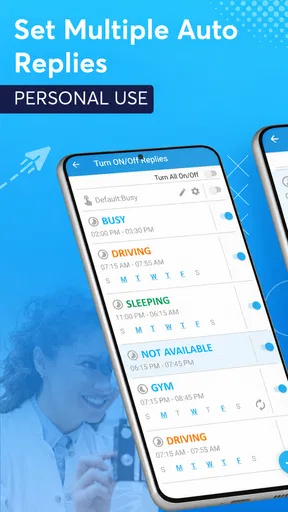
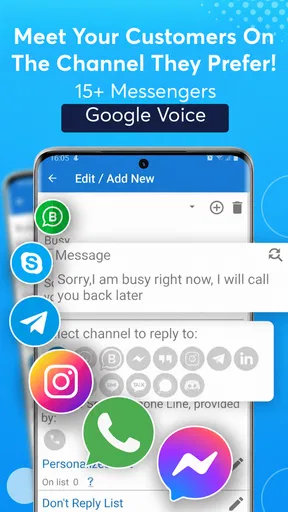
The first thing I noticed is that the app is built around decisions rather than conversation screens. I am not browsing chats or composing long messages. I am choosing when an automatic answer should operate, what that answer should say, and which incoming texts should receive it. That makes the basic purpose understandable, especially for someone who wants a focused tool instead of a large messaging suite.
Still, automation needs careful reading. A manually sent text is easy to understand because I see the recipient and the message before pressing send. An automatic reply can affect several people while I am not watching the phone, so I would not rush through the setup. I recommend writing the response first in a notes app, checking its tone, and then entering it into the rule. A short sentence such as “I’m unavailable right now and will reply later” is safer than a detailed explanation that could reveal personal information.
For me, the most important usability question is not whether the app can send a reply. It is whether I can predict exactly when it will do so. Before relying on it, I would create one narrowly defined rule and test it with a trusted contact. That small test can reveal misunderstandings about timing, recipients, or activation before the app is allowed to answer a customer, family member, or colleague on my behalf.
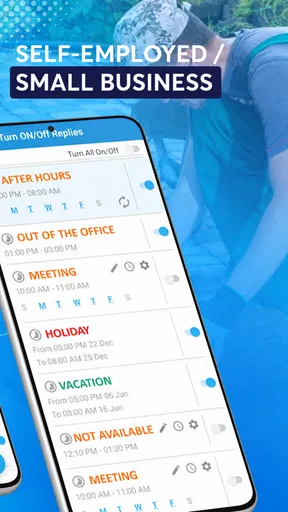
The interface is more approachable when I treat each automatic response as a separate situation. One message can be reserved for periods when I am busy, another for being away, and another for times when I do not want to engage with unknown senders. Separating these purposes is clearer than trying to make one universal reply cover every circumstance.
That approach also helps users with different reading needs. A person who finds dense screens tiring can prepare one simple rule at a time instead of configuring every possibility in one sitting. Someone supporting an older relative can help draft messages with plain language and review the activation choices together. The app does not need to be complicated to deserve caution; automation itself makes small misunderstandings more consequential.
Motor and sensory considerations
Automatic replies can be helpful when reaching the phone is difficult. If I am carrying shopping bags, cooking, using public transport, or dealing with a situation where looking down at a screen is unsafe, a prepared response can communicate the essential fact that I am not available. The benefit is not limited to disability-related use. It also applies whenever attention, hand movement, or visual focus is temporarily occupied.
For a user with limited fine-motor control, the strongest part of this concept is the reduction in repeated actions. Instead of unlocking the phone, opening a conversation, typing, correcting mistakes, and sending the same explanation several times, I can configure the response beforehand. That does not remove every setup demand, but it moves the effort to a calmer moment when I have time to review the wording.
People with low vision may appreciate a short, uncluttered message more than a complicated one, but I would not assume that every control will suit every reader. Text size, contrast, screen-reader behavior, and touch-target comfort can vary with the phone and Android settings. I would check the app personally with the accessibility options already used on the device rather than relying on a general promise of accessibility.
Sensory needs matter in another way. Automatic communication can reduce the pressure of incoming texts, but it can also create unexpected activity if a rule is too broad. A person who is sensitive to repeated notifications may want to limit the situations in which the responder is active and avoid wording that invites a long back-and-forth. The best configuration is often the quietest one that still sets a clear boundary.
I also see value for people who process messages slowly or need more time to formulate a response. An automatic answer can buy that time without forcing an immediate explanation. However, it should not pretend that a real conversation has taken place. The reply should set expectations, not imitate the user’s voice so closely that the recipient believes the person has personally answered.
Situational access beyond ordinary busy periods
A realistic example is a small service provider who spends the afternoon moving between appointments. Incoming texts may concern availability, directions, or a request for a quick update. Rather than leaving every sender with silence, the provider can use a brief away message and return to the conversations in a planned block later. The important advantage is consistency: the same basic boundary goes out even when the phone is in a pocket.
Another example is someone attending a medical appointment or supporting a family member. In that situation, answering can be emotionally or physically difficult, while silence may cause unnecessary worry. A carefully worded response can say that the person is unavailable and will respond when possible. I would avoid including the reason unless it is genuinely necessary, because an automatic message can reach people who do not need private details.
For travel, study, or focused work, the app may be more useful than repeatedly changing a profile status in a separate chat service. Text messages can come from people who are not using the same messaging platform, so an SMS-based responder reaches the communication channel already in use. That is a meaningful difference from alternatives built around a particular social network or workplace system.
It may also help a household manage a shared phone used for basic contact. A family member can prepare a direct reply for periods when nobody is monitoring the device closely. I would still keep the wording neutral and avoid promising a response at a specific time unless that promise can actually be kept. Automation should reduce uncertainty, not create a new obligation.
There is a useful trade-off here: the more specific the rule, the more relevant the response can be, but the more carefully it must be maintained. A general message is easier to manage and less likely to be sent in the wrong context. Several specialized messages may feel more personal, yet they increase the chance that an old rule remains active after circumstances change.
Where it differs from usual alternatives
The closest alternative is often doing nothing and replying manually later. That costs no money and avoids configuration, but it also leaves senders guessing. A built-in driving or focus feature may cover some situations with less setup, depending on the phone, but a dedicated app is appealing when I want automatic SMS responses to be a central task rather than a small part of a broader mode.
Chat apps can offer away indicators, scheduled messages, or business tools, but those features usually apply only inside their own services. SMS Auto Reply - Autoresponder is aimed at standard text messaging, which is useful when contacts are spread across different devices and apps. The compromise is that SMS automation is more dependent on the phone’s operating environment and on careful rule management.
I would not choose it as a replacement for a full customer-support system. A business with several staff members, shared records, detailed routing, or compliance requirements needs stronger coordination than an individual auto-response tool is designed to provide. I also would not choose it for someone who rarely receives texts or who is comfortable answering manually. The $7.49 purchase makes more sense when the saved attention is a recurring benefit.
The app has a 3.1 average from around 536 ratings, with about 108 written reviews and over 10K installs. Those figures suggest a modest user base rather than universal adoption, so I would approach it as a specialized utility. Its value depends heavily on the user’s situation, phone behavior, and willingness to test automation rather than on the size of its audience.
Practical configuration habits that matter
My first recommendation is to begin with the smallest useful scope. Configure one response for one recognizable situation, test it with a second phone or a trusted person, and only then consider adding more cases. This is especially important for users who rely on predictable communication, because a broad rule can be more disruptive than helpful.
My second recommendation is to write for quick reading. Automatic texts should put the key information near the beginning and avoid sarcasm, abbreviations, or emotional language. A recipient may be reading on a small screen, using a translation tool, or dealing with their own accessibility needs. Plain wording makes the response easier for everyone to understand.
Third, I would review the active setup whenever my schedule changes. A response prepared for a holiday, a work shift, or a temporary period of reduced availability should not remain active by accident. I would also check the message after changing phones, updating the operating system, or altering battery-management settings. Background automation is only useful when it continues to behave as expected.
There is another less obvious consideration: the responder should not become a substitute for prioritizing urgent contacts. If someone may need immediate help, an automatic text can create false reassurance. I would tell important contacts how to reach me in urgent situations and keep the automatic wording honest about the fact that it is not a live reply.
Finally, I would avoid using an automatic response to handle conflict. A neutral availability message is appropriate; a message intended to argue, shame, or make a point is not. Because the app sends on my behalf, a moment of frustration in the setup could become a repeated communication problem.
Remaining barriers and points of friction
The biggest barrier is configuration confidence. A person who finds settings difficult may understand the idea but still struggle to build a rule they trust. Assistance from a family member or support worker can help, but that introduces another practical requirement: the user must be comfortable sharing access to the phone and reviewing the message together.
There is also a cognitive load that is easy to underestimate. Users need to remember which response is active, what it says, and when it should stop. If several situations overlap, the mental model becomes harder to maintain. I would keep the number of active scenarios low and name each one in a way that describes its purpose rather than its mood.
Motor accessibility is improved by reducing repeated typing, but the initial setup still requires tapping, reading, and editing. Users with tremors, limited reach, or fatigue may need to configure the app in short sessions. A prepared text can be copied from another app to reduce typing, though I would always proofread it after pasting.
Some people may also find automatic communication socially uncomfortable. Recipients can misunderstand a generic response, especially if they expect a personal answer. That is why I prefer wording that acknowledges unavailability without sounding like a promise, a refusal, or a conversation completed by machine.
The price is another consideration. Since this is a paid app at $7.49, I would not install it merely to try automatic texting once. Someone who needs a responder only during an occasional event may be better served by a built-in phone function or manual message. The purchase is easier to justify for recurring work, caregiving, travel, or attention-management needs.
Who should use it, and who should skip it
I think it is a good fit for people who receive regular SMS messages and often cannot answer immediately. Independent workers, caregivers, students, drivers when safely configured before travel, and anyone protecting scheduled focus time can all find a practical use for it. It is particularly relevant when contacts do not share one chat platform.
I would recommend extra caution for users who need guaranteed delivery, detailed business workflows, or strict control over every outbound message. In those cases, a manual process or a more formal communication system may be safer. I would also suggest skipping it if the phone’s settings and automation behavior already provide everything needed without an additional purchase.
For users with accessibility needs, I see the strongest benefit in reducing repetitive interaction and allowing communication boundaries to be prepared in advance. I would not describe it as universally accessible, though. The right choice depends on whether the individual can comfortably read and operate the configuration screens with their device settings, and whether automatic texts genuinely reduce pressure rather than add confusion.
My inclusive verdict after using it
SMS Auto Reply - Autoresponder is a focused solution to a familiar problem: I cannot answer now, but I do not want every sender left without context. Its value appears in repeated everyday situations, not in occasional novelty. Once configured carefully, it can save hand movement, attention, and repeated typing while keeping SMS contacts informed.
Its limitations are equally clear. It asks me to think carefully about rules, wording, and activation, and it is not a complete replacement for built-in phone tools, chat-platform features, or professional support systems. The paid price raises the standard it needs to meet, especially for people who only need an away message once in a while.
With a 3.1 average and a relatively small audience of over 10K installs, I would approach it as a specialized utility rather than an automatic recommendation for every Android user. For someone who regularly needs SMS auto reply during work, travel, caregiving, or periods of limited attention, it can be worthwhile. For everyone else, the simpler alternative may be better.
My final advice is to treat the app as a communication boundary, not as a replacement for communication itself. Keep the message short, test the setup, limit the active situations, and review it whenever life changes. Used that way, SMS Auto Reply - Autoresponder can make ordinary texting more manageable while respecting different abilities, schedules, and moments when reaching for a phone is simply not practical.
Verdict
Strengths of SMS Auto Reply - Autoresponder
- Automatically replies to incoming SMS while you are busy or unavailable.
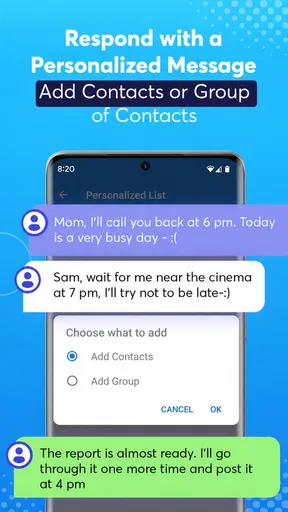
- Custom messages can be tailored for different contacts or situations.
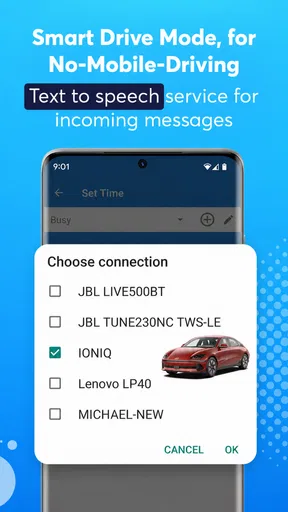
- Useful for driving, meetings, vacations, and other offline periods.
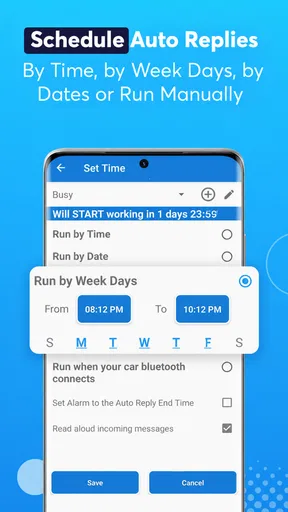
- Scheduling options help activate replies during specific times or days.
- Can reduce missed communication without requiring constant phone access.
Limitations of SMS Auto Reply - Autoresponder
- Some features may require payment or contain advertising.
- Incorrect settings could send replies to unwanted or unknown numbers.
- Automated messages may feel impersonal in sensitive conversations.
- Compatibility with newer Android versions or devices may vary.
- Requires permission to access SMS and other sensitive phone functions.
Similar Picks in This Category
View All
Google Messages
Google LLC4.6

Gmail
Google LLC4.1

Google Meet
Google LLC4.4

Google Chrome
Google LLC4.1

WhatsApp Messenger
WhatsApp LLC4.6

Carrier Services
Google LLC4.2
Frequently Asked Questions
What is SMS Auto Reply - Autoresponder and how does it work?
SMS Auto Reply - Autoresponder is designed to send automatic text-message responses when you are unavailable, busy, driving, sleeping, or away from your phone. After creating a message and selecting when it should be active, the app can reply to incoming SMS messages according to your chosen rules. Depending on the version and device, available options may include contact filters, schedules, keywords, and different reply profiles.
Can I customize the automatic replies and choose who receives them?
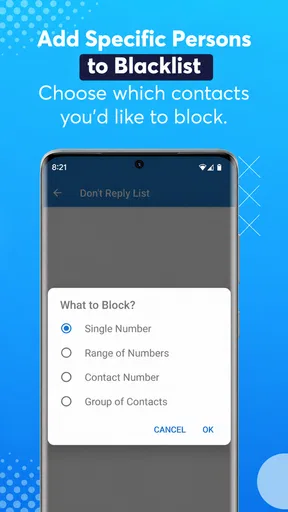
Yes, customization is one of the app’s most useful features. You can generally write your own response instead of relying on a generic message, then configure the conditions under which it will be sent. Contact-based rules may allow you to reply to everyone, selected people, or specific groups. Before downloading, check the current feature list because filtering and profile options can vary by Android version and app edition.
Does SMS Auto Reply - Autoresponder work when my phone is offline?
Automatic SMS replies normally require the phone to be switched on, connected to the mobile network, and able to receive incoming text messages. The app cannot reliably respond if the device is powered off, has no cellular signal, or has restrictions preventing it from running in the background. Internet access may not be necessary for standard SMS handling, but some additional features, advertising, updates, or cloud-related functions could require connectivity.
What permissions does the app require, and is my message data private?
An auto-reply application may request access to SMS messages, phone status, contacts, notifications, and permission to run in the background. These permissions are needed to detect incoming texts, identify senders, and deliver responses, but they also involve sensitive personal information. Review the app’s privacy policy and the permissions shown on the Google Play listing before installation. Avoid granting access that is not clearly connected to the feature you intend to use.
Are there any limitations or risks when using automatic SMS replies?
Automatic replies are convenient, but they should be configured carefully. A poorly written rule could send messages to the wrong person, respond repeatedly, or reveal that you are away. Carrier charges may apply depending on your mobile plan, and Android battery-saving settings can interrupt background operation. The app may also have limited compatibility with newer Android releases or manufacturer-specific restrictions, so test each profile with a trusted contact before relying on it.
